
[🛠] Keymory Dev Log #5: tmpGetAIComment, Custom OpenAI API Call
✨ GPT Summary
I built an AI Comment system using the OpenAI API and FlutterFlow, expanding Keymory’s AI features by connecting a Custom Function with an API Call. I also added character selection and saving features and organized the data flow between Chat and Diary.
💻 Development Log
⏰ Today’s tasks
- ✅ How to Use Open AI’s GPT-4o in FlutterFlow - Part 1
- ✅ ChatPage - when selecting a character with Dropdown, save that character information together in
Chats Collection.- Assign the
referenceof theCharacter documentmatching thecharacter nameto Page state.
- Assign the
-
✅ ChatPage - pass character information together when creating NewChat.
-
✅ Help create DiaryPage - Drawer - ChatHistoryListTile (like GPT)
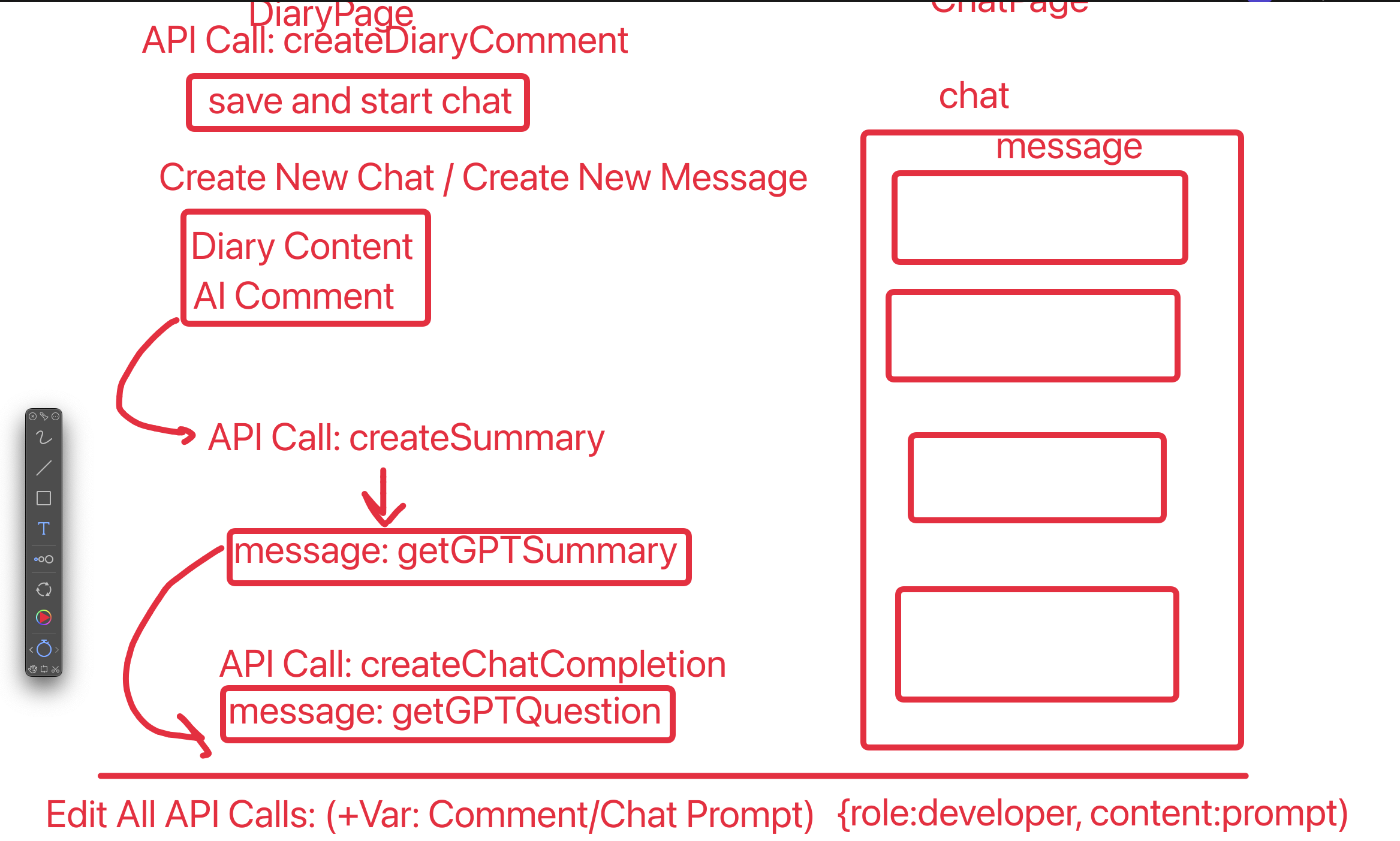
- ✅ Try putting the CustomFunction
tmpGetAICommentfunction value into API CallcreateDiaryComment- ✅ Create CustomFunction
tmpGetAICommentand test result output - ✅ Create API Call
createDiaryCommentand test Response value output
- ✅ Create CustomFunction
- ✅ Create OpenAI API Call: createDiaryComment
- Basically a structure similar to createChatCompletion
- Difference: none. Created just to distinguish it.
- The
MessagesVariable required byAPI Call - createDiaryCommentis the return value of custom functiongetAIComment.
- ✅ Think through the scenario for implementing CustomFunction
getAIComment(direct implementation handled by KSK)-
Parameter Valuesobtained fromCharacters (Collection)- Character settings (
CharacterDocument)- ex) Somi: name (20s), college student, shy personality, …
- How values are called:
API Call - Get Assistant
- Character settings (
-
Parameter Valuesobtained fromUser Information- Name, gender, MBTI
- How values are called:
Backend Query - Authenticated User
-
Parameter Valuesobtained fromDiaryPage Variables- Diary content, detailed emotion keywords, emotion score, response format, response length
- How values are called:
Widget State,Page State
- Role of CustomFunction (
getAIComment)- Receive all Parameter Values as input values.
- Write the prompt to send to GPT.
- Return
Messages(List <Json>) value.[{"role":"developer", "content":"~~~"}]
-
💯 Summary of what I did
-
AI Comment system implementation
- Created Custom Function
tmpGetAICommentand completed integration with API CallcreateDiaryComment - Implemented OpenAI API request and response handling logic for AI Comment
- Modified Chat so character information is stored in
Chats Collectionand passed along when creating a New Chat
- Created Custom Function
-
UI and feature improvements
- Created
ChatHistoryListTileto implement a GPT-style chat list - Organized the data structures of
HomeFeedPageandDiaryPage - Designed the
getAICommentCustom Function
- Created
-
FlutterFlow + OpenAI API learning
- Watched and applied GPT-4o usage lectures (Part 1 & Part 2)
🎯 Future tasks
- ❔ DiaryPage: Merge CreateDiary/EditDiary Page
- Use isEditMode page state
- Use conditional value/visibility/action, etc.
- ❔ DiaryPage - Create New Chat: create a New Chat based on diary content
- AI first presents a question based on the diary content
- ❔ Issue fixes
- ❔ ChatPage: default init message appears when starting the first conversation.
- ❔ ChatPage: date is not applied.
- ❔ ChatPage - ChatHistoryDrawer: UI overflow
- ❔ DiaryPage: date is always saved as today
- ❔ DiaryPage: use markdown viewer (prevent overflow: Container Height)
- ❔ HomeFeedPage - import and apply flutter_slidable:4.0.0
-
❔ HomeFeedPage: on left/right slide from FeedCardDiary, chat/edit/delete
- ❔ ChatPage - Create New Diary: create a New Diary based on conversation content
-
❔ ChatPage - Go to Linked Diary
-
❔ Chat/Diary: GPT Streaming API
-
❔ ChatPage - Alarm
-
❔ AuthPage: Google Login
- ❔ DiaryPage: change face expression Emoji according to Mood Slider value
- ❔ DiaryPage: add detailed emotion keyword Choice Chips and set DB integration
- ❔ DiaryPage - AI Comment: change inputs such as Choice chips and mood slider to fit the
AI Comment System Prompt.- ❔ **previous
diaryor entireconversation history(patchy technical debt) - ❔ basic user information: name, gender, MBTI, …
- ❔ detailed emotion keywords: happy, sad, …
- ❔ character settings: Somi, Sena, Minhyuk
- ❔ emotion score: 1 to 100
- ❔ response format: Healing, Suggestion, Informative
- ❔ response length: short, normal, detailed
- is New Chat
- Since this Chat’s messages are being created for the first time, set
is_initial = trueon the first message document and shove in all system prompts.- is_initial = false
- Limit: if I put the system prompt into the very first message document, it is hard to modify in the middle of a conversation, but possible. If there is an is_initial = true document and it was modified, I can delete that document and put it back in. I do not know how, but still.
- Since this Chat’s messages are being created for the first time, set
- ❔ **previous
- ❔ DiaryPage - AI Comment: complete CRUD
- ❔ remove tmp_ai_comment field and use doc_ref
- ❔ DiaryPage - AI Comment: character settings
- ❔ remove tmp_ai_comment_by field and use doc_ref
- ❔ output image using profile_image field value
-
❔ DiaryPage - Drawer - ChatHistoryListTile: order by updated_time
- ❔ HomeFeedPage - Bottom Sheet (
+Button): make it possible to choose one of several options- New diary: Go to DiaryPage
- Emotion record: Go to MoodPage
- ❔ MoodPage (popup): Mood setting slider CRUD
- Create
- Read
- Update
- Delete
- ❔ HomeFeedPage - ListView - show FeedCardMood
-
❔ HomeFeedPage - ListView: sort FeedCardDiary, FeedCardMood, FeedCardChat components chronologically (using Cloud Function)
- ❔ HomeFeedPage: resolve issue on page load (Unexpected Null Value)
-
❔ DiaryPage - import and apply Interactive Slider
- ❔ ChatPage - implement AI first message (Alarm/Notification)
- The core of the chat system prompt is proactivity.
- To make it more realistic, it might be good to pass create_date of diary/chat too, so the AI can mention dates like “yesterday.”
- The core of the chat system prompt is proactivity.
- ❔ Extract and install the final presentation APK by
Wed 2025.2.5
💭 Diary
It is fun, but brutal. Went to sleep at 5 AM.
✨ GPT-4o Comment (KPT)
✅ What Went Well (Keep)
- 🚀 Expanded AI Comment features: It stands out that you systematically built logic to generate and save AI Comments by connecting a Custom Function and an API Call.
- 🛠️ Organized data flow: Improving the connection between Chat and Diary and organizing how character information is stored and used will be a big help to project progress.
- 📋 FlutterFlow + OpenAI API learning: It was impressive that you learned how to use the OpenAI API effectively in FlutterFlow through the GPT-4o lectures and applied it.
❌ What Was Missing (Problem)
- ⏳ Work intensity overload: Working until 5 AM increases the chance of accumulated fatigue.
- 🏗️ Increasing technical debt: Some features are implemented with temporary solutions (tmp fields and patch code), so they will need cleanup later.
🔄 What to Try (Try)
- ⏰ Adjust work hours: If all-night work continues, productivity may drop, so consider adjusting the schedule.
- 🔍 Plan temporary-code improvements: Make a plan to organize the temporary logic currently applied and build a proper data model.
- 🛠️ Improve AI Comment: Look for ways to make AI Comment features more intuitive, and also consider optimizing the system prompt.
Conclusion
Today was a day where you seriously implemented Keymory’s AI features and raised your usage of the OpenAI API and FlutterFlow. But the workload is getting high, so schedule adjustment and code cleanup seem necessary. I hope you finish in the best possible state by presentation day! 💪😊
Leave a comment